
Filejoker Payment Methods: Credit Cards, Crypto & Reseller Options
When upgrading to Filejoker Premium, choosing the right payment method ensures both instant account activation and complete transactional privacy. Because FileJoker serves a worldwide audience of content creators, archivists, and power downloaders, the platform supports a wide array of payment channels.
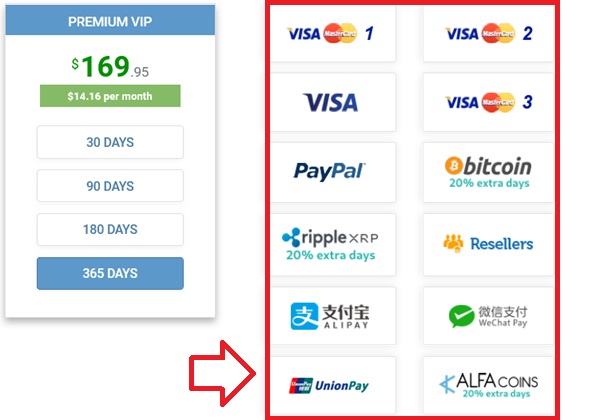
In this guide, we review all supported payment options, compare transaction fees and processing speeds, and provide troubleshooting advice for common checkout issues.
1. Credit & Debit Cards (Visa, MasterCard)
Card payments remain the fastest checkout route for most global users:
- Instant Activation: Account credentials and premium perks activate the moment the transaction settles (usually under 10 seconds).
- Discreet Billing Descriptors: To safeguard user privacy, FileJoker processes card payments via verified billing partners with neutral, discreet transaction descriptors on bank statements.
- 3D Secure Authentication: Card transactions require standard one-time password (OTP) or mobile banking push verification to protect against fraudulent charges.
2. Cryptocurrency: Bitcoin, Ethereum & USDT
For privacy-minded downloaders and international users facing restrictive banking rules, cryptocurrency provides the ultimate payment pathway.
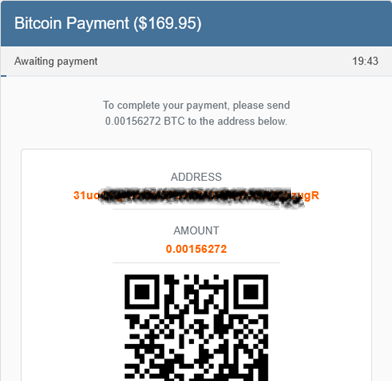
Why Crypto Checkout is Superior for Global Users
- No Foreign Exchange Surcharges: Mainstream credit cards often levy a 3% to 5% foreign transaction fee on cross-border payments. Crypto completely eliminates these banking markups.
- Complete Financial Privacy: Blockchain transactions require zero disclosure of card numbers, billing addresses, or bank accounts.
- Faster Multi-Month Commitments: Crypto is particularly advantageous when purchasing 180-day or 365-day packages where percentage savings are largest.
Blogger Tip: When paying with crypto, using stablecoins like USDT on low-fee networks (TRC20) typically saves you significant network gas fees compared to mainnet Ethereum during peak congestion hours.
3. Official Authorized Resellers & Local Payment Gateways
If your local credit card issuer blocks international digital hosting merchants, or if you prefer localized e-wallets, FileJoker’s network of authorized resellers provides an ideal alternative.
Official resellers support numerous localized payment systems:
- E-Wallets: WebMoney, Perfect Money, and regional digital wallets.
- Prepaid Vouchers: Paysafecard, Neosurf, and cash-based merchant cards.
- National Bank Transfers: Direct wire and local instant debit networks across Europe, Asia, and Latin America.
Upon completing checkout with an authorized reseller, you receive an alphanumeric voucher key. Enter this key under the “Redeem Voucher” section in your FileJoker profile, and your premium status activates instantly.
Troubleshooting Common Payment Declines
If your card transaction fails at checkout, the issue is almost always on the issuing bank’s side rather than FileJoker’s gateway. Follow these steps:
- Enable International Transactions: Many domestic banks disable overseas digital transactions by default. Log into your banking app and verify that international purchases are enabled.
- Verify 3D Secure Compatibility: Ensure your phone number is linked to your banking profile to receive 3D Secure SMS codes.
- Switch to an Official Reseller or Crypto: If your bank’s automated fraud filters repeatedly block the transaction, buying a voucher key from a trusted reseller or checking out with crypto works 100% of the time.
Last Update: 20 September 2026 - 12:00